
Why Hono Is the Web Framework You Should Try in 2025
Why Hono Is the Web Framework You Should Try in 2025
If you’re a developer looking for a fast, flexible, and modern web framework, let me introduce you to Hono. I’ve been building web apps for years, and Hono has quickly become one of my go-to tools for creating server-side applications. It’s not just another framework—it’s a lightweight, standards-based powerhouse that feels like a breath of fresh air in the crowded JavaScript ecosystem. Here’s why I think Hono deserves a spot in your next project.
What Makes Hono Special?
Hono, which means "flame" in Japanese, lives up to its name by being blazingly fast and delightfully simple. Built on Web Standards, it runs on virtually any JavaScript runtime—Cloudflare Workers, Deno, Bun, Vercel, AWS Lambda, Node.js, and more. Whether you’re deploying to the edge or a traditional server, Hono’s got you covered with the same codebase. This multi-runtime flexibility is a game-changer for developers who want to write once and deploy anywhere.
At its core, Hono is designed to be small and focused. The hono/tiny preset clocks in at under 14kB, making it one of the leanest frameworks out there. Compare that to Express, which is over 500kB, and you’ll see why Hono is a favorite for performance-obsessed developers. It has zero dependencies and leans entirely on Web Standard APIs, so you’re not dragging along unnecessary baggage.
Speed That Sets It Apart
Performance is where Hono shines. Its RegExpRouter is one of the fastest routers in the JavaScript world, using a single, precompiled regex to match routes instead of slow linear loops. I’ve built APIs with Hono that handle thousands of requests per second on Cloudflare Workers without breaking a sweat. If you’re working on edge computing or serverless, where every millisecond counts, Hono’s speed is a massive win.
But Hono doesn’t stop at raw performance. It also offers SmartRouter, which dynamically picks the best routing strategy for your app, and PatternRouter for simpler, smaller setups. This flexibility means you get top-tier performance without sacrificing ease of use, whether you’re building a tiny API or a complex application.
A Developer Experience That Feels Right
Let’s talk about the part that keeps me coming back: Hono’s developer experience. If you’ve ever wrestled with clunky APIs or vague error messages, Hono feels like a warm hug. Its APIs are clean and intuitive, with a syntax that feels like a modern take on Express. Here’s a quick example of how easy it is to set up a basic API:
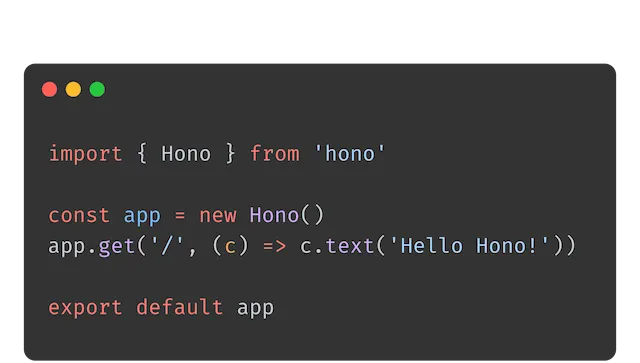
import { Hono } from 'hono';

const app = new Hono();

app.get('/', (c) => c.text('Hello, Hono!'));
app.get('/api/posts/:id', (c) => {
  const id = c.req.param('id');
  return c.json({ id, title: `Post ${id}` });
});

export default app;
This code runs on Cloudflare Workers, Deno, Bun, or Node.js without changes. Need to add a POST endpoint? Just chain it:
app.post('/api/posts', async (c) => {
  const body = await c.req.json();
  return c.json({ message: 'Post created', data: body }, 201);
});
Hono’s Context object makes it dead simple to access request and response data, set headers, or parse query parameters. It’s the kind of API design that lets you focus on building features instead of fighting the framework.
TypeScript Support That Actually Helps
As someone who’s all-in on TypeScript, Hono’s first-class TypeScript support is a huge selling point. It’s not just tacked on—Hono is written in TypeScript, and it shows. Path parameters are automatically typed as literals, and middleware like validators integrate seamlessly with libraries like Zod or Valibot. This means you can write type-safe APIs without jumping through hoops.
For example, Hono’s Validator middleware lets you define schemas and share them with clients for end-to-end type safety:
import { Hono } from 'hono';
import { z } from 'zod';
import { zValidator } from '@hono/zod-validator';

const app = new Hono();

const schema = z.object({
  name: z.string(),
  age: z.number().min(18),
});

app.post('/api/users', zValidator('json', schema), (c) => {
  const data = c.req.valid('json');
  return c.json({ message: `Welcome, ${data.name}!` });
});

export default app;
This kind of integration makes building robust, type-safe APIs a breeze, especially for teams that value reliability.
Batteries Included, But Not Bloated
Hono comes with a rich set of built-in middleware for common tasks—think CORS, logging, JWT authentication, and compression. Need something custom? Writing your own middleware is straightforward, and there’s a growing ecosystem of third-party middleware for things like OpenAPI documentation or rate limiting.
One feature I love is Hono’s JSX support for server-side rendering. Unlike React, which requires renderToString, Hono treats JSX as strings, making it lightweight and compatible with runtimes like Cloudflare Workers. Here’s how you might render a simple page:
app.get('/welcome', (c) => {
  return c.html(
    <html>
      <body>
        <h1>Welcome to Hono!</h1>
      </body>
    </html>
  );
});
It’s perfect for building static sites or adding server-rendered pages without a heavy frontend framework.
Why Hono Fits 2025’s Web Development Landscape
The web is moving toward edge computing and serverless architectures, and Hono is built for this future. Its compatibility with platforms like Cloudflare Workers and Vercel means you can deploy closer to your users, reducing latency and costs. Plus, its lightweight nature makes it ideal for microservices or small APIs where startup time matters.
Hono also plays nicely with modern tools. Want to build a full-stack app? Pair it with HonoX, a meta-framework that adds file-based routing and client-side hydration, similar to Next.js but leaner. Need a database? Hono integrates seamlessly with Cloudflare D1 or other serverless databases, as shown in the official docs.
Real-World Use Cases
I’ve used Hono for everything from tiny APIs to internal tools at scale. For example, I recently built a real-time analytics dashboard on Cloudflare Workers using Hono and D1. The API handled thousands of requests per minute, and the TypeScript integration caught bugs before they hit production. Companies like Upstash and even Cloudflare itself use Hono for internal APIs, proving its reliability in production.
If you’re a solo developer or a small team, Hono’s simplicity and small footprint make it a no-brainer for rapid prototyping. For larger teams, its TypeScript support and middleware ecosystem ensure you can scale without chaos.
Getting Started Is a Breeze
Ready to give Hono a spin? Setting up a project takes minutes. Use the create-hono CLI to scaffold a new app:
npm create hono@latest
Choose your runtime (e.g., Cloudflare Workers or Deno), and you’ll get a starter template with a local dev server. Run npm run dev, and you’re coding at http://localhost:8787. Deploying is just as easy—push to your platform of choice, and Hono handles the rest.
Final Thoughts
Hono isn’t just fast—it’s a framework that respects your time and creativity. Its lightweight design, stellar TypeScript support, and multi-runtime compatibility make it a perfect fit for modern web development. Whether you’re building a serverless API, a static site, or a full-stack app with HonoX, Hono delivers performance and simplicity without compromise.
So, why not try Hono for your next project? Head over to hono.dev to check out the docs and get started. I’m betting you’ll be as hooked as I am.

